Web Technologies 2026 · BiUH · Lesson 1
Web Fundamentals
How the web works · browsers and DevTools · HTTP · standards · your environment · the three pillars
Six parts, one picture
What this lesson covers.
| 1.1 | How the web works — history, client/server, URLs, DNS |
| 1.2 | Browser DevTools — the instrument you diagnose with |
| 1.3 | HTTP — requests, responses, status codes |
| 1.4 | Standards and why pages work in every browser |
| 1.5 | Your development environment |
| 1.6 | HTML, CSS, JavaScript — the three pillars |
Full lessons at webtech.landrock.io/course — these slides are the spine, not the detail.
1.1
How the web works
1989 · CERN
One person, four inventions.
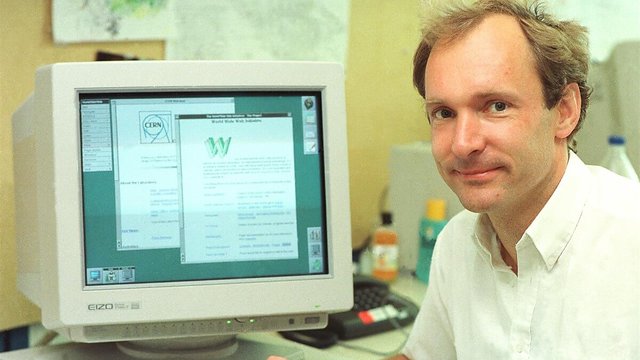
He wanted researchers to share documents. To make that possible he had to invent everything:
All four are still in this room today — and the first website is still online at info.cern.ch.
Thirty-five years, compressed
How it got here.
The model everything rests on
Client and server.
The client — your browser
Asks for things. Renders HTML and CSS. Runs JavaScript.
Chrome, Safari, Edge, Firefox
The server
Holds things. Answers requests. Sends back files.
Nginx, Apache, Node
Every single thing in this course is a detail of that loop.
A URL is not one thing
It has parts, and each does a job.
www is just a hostname — a name for one machine, like mail or ftp once were. The fragment is the odd one: the browser keeps it, the server never sees it.
DNS
A domain is a name for a number.
Nobody remembers numbers. DNS is the phone book — and like a phone book, it is cached at every level so the lookup usually never leaves your machine.
nslookup example.com # try it tonightLesson 1.2
DevTools
Not a tour. The instrument you will diagnose with all semester.
Open it now — you will use it every day
Three ways in.
- Windows / Linux:
F12orCtrl + Shift + I - macOS:
Cmd + Option + I - Any browser: right-click anything → Inspect
Right-click → Inspect
is the single most useful habit in this course.
The panels that matter
Four tabs do almost everything.
Elements answers "why does it look like that". Network answers "why is it slow".
The part that surprises people
You can change anything —
and break nothing.
Edit the HTML. Change a colour. Delete an element. Toggle a CSS rule off. It is your copy, in your browser, and refresh undoes all of it.
Which makes it the safest place to experiment you will ever have. Change it there first, then put it in your file.
Lesson 1.3
HTTP
The conversation between the browser and the server
Every single thing on the web
A request, then a response.
→ the browser asks
GET /index.html HTTP/1.1
Host: example.com

← the server answers
HTTP/1.1 200 OK
Content-Type: text/html

<html>…</html>
That is it. Everything else is detail on top of this exchange.
Methods — what you are asking for
| Method | What it means |
|---|---|
GET | give me this — the one you use thousands of times a day |
POST | here is something new (a form, a login, an upload) |
PUT | replace what is there |
DELETE | remove it |
The difference that matters: GET puts data in the URL, so it is visible and bookmarkable. POST puts it in the body.
Never put a password in a GET. It ends up in browser history and server logs.
Status codes · the server's one-word answer
4xx is your fault. 5xx is theirs.
Knowing which is which is half of debugging a deployment.
Lesson 1.4
Standards
Why a page you write works in a browser you have never used
Nobody owns the web
That is the whole point.
HTML, CSS and HTTP are agreements, not products. The W3C and WHATWG write them down; browser makers implement them.
Which is why a file you write tonight opens on a phone in Brazil, a kiosk in Berlin and a browser that does not exist yet.
Compare: a document from a 2005 word processor. Standards are why the web does not rot.
Progressive enhancement
Build so it degrades well.
1 · It works
Plain HTML. Readable by anything, including a screen reader and a search engine.
2 · It looks right
CSS on top. Better, but nothing depended on it.
3 · It feels good
JavaScript last. If it fails, the page still works.
The order is not aesthetic. Each layer assumes the one below it might be all there is.
Two free tools, no excuse not to use them
Check your work.
- validator.w3.org — paste a URL, get every markup error
- caniuse.com — can I use this CSS property yet, and where?
Both answer questions that are otherwise guesswork, in about ten seconds.
A validator will find the unclosed tag you have been staring at for twenty minutes.
Lesson 1.5
Your environment
Editor · browser · local server · version control
Four things, and that is all
Set this up once, properly. You will use the same loop — edit, save, look — for the next nine weeks.
Naming files · boring, and it will save you
Three rules.
- All lowercase.
About.htmlandabout.htmlare the same file on your laptop and different files on the server. This breaks real sites. - No spaces. Use
-. A space becomes%20in a URL. index.htmlis the front page of any folder. That name is special.
Rule one causes the single most common "it works on my machine" failure in this course.
Git · three words for now
git add | choose — which changes count |
git commit | record — save them, with a message |
git push | send up — put them where the world can see |
No branches. No merging. Those arrive when you need them — and not before.
Lesson 1.6
The three pillars
HTML · CSS · JavaScript — and why they are separate
The house
HTML
HyperText Markup Language
The walls, rooms and doors.
What the thing is.
CSS
Cascading Style Sheets
Paint, furniture, light.
What it looks like.
JavaScript
…no relation to Java
Plumbing and electricity.
What it does.
A house with no paint is still a house. A page with no CSS still works.
Every acronym in this course, spelled out
They all mean something.
Notice how many start with "HyperText". Links were the whole idea — everything else was built to serve them.
And the odd one out
JavaScript has nothing
to do with Java.
It was called LiveScript. It was renamed in 1995 because Java was popular and the marketing department wanted the association.
Two entirely different languages, one confusing name, thirty years of students asking the same question.
Why keep them apart?
Separation of concerns.
- Change the look of every page by editing one CSS file
- A screen reader reads the HTML and ignores the paint
- When something breaks, you know which of the three to open
That last one is why this matters to you
in about three weeks.
All three, on one page
<!-- HTML: what it is -->
<button id="go">Click me</button>

/* CSS: what it looks like */
#go { background: #c2410c; color: white; }

// JavaScript: what it does
document.getElementById('go')
  .addEventListener('click', () => alert('Hello'));
Three languages, three jobs, one button.
When it goes wrong — and it will
Which of the three is broken?
| What you see | Where to look |
|---|---|
| text in the wrong place, tags showing | HTML — an unclosed tag |
| it looks unstyled | CSS — check the <link> path |
| the button does nothing | JavaScript — open the Console |
| an image is missing | the path, almost always |
The Console tells you which file and which line. Read the error before you change anything.
Lesson 1 · done
What you should be able to say now.
- What happens between typing an address and seeing a page
- What a URL is made of, and what DNS does
- How to open DevTools and what the four panels are for
- What a 404 means — and whose fault it is
- Which of HTML, CSS or JavaScript to open when something breaks
The full lessons, with the detail these slides skip.