Web Technologies 2026 · BiUH · Exercise · Session 6
The Useless
Machine
A website toy — simple, surprising, endless. Built with AI, understood by you.
Before anything else
Turn it on.
One switch. Go on.
Try it more than once. Try it with the keyboard: Tab, then Space.
What is a useless machine?
A box with one switch.
- You flip the switch on.
- The lid opens. A hand comes out.
- It flips the switch off.
- The hand goes back. The lid closes.
1952. Marvin Minsky imagines it at Bell Labs and calls it the ultimate machine. Claude Shannon — the father of information theory — builds one and keeps it on his desk.
"a machine that does nothing — absolutely nothing — except switch itself off"
Seventy years later people still build them — and still laugh every time.
The real thing · ten seconds
Watch it once.
The hand does not hurry, and it never misses. Now notice the part of you that wants to press it again.
1960s · sold by mail order
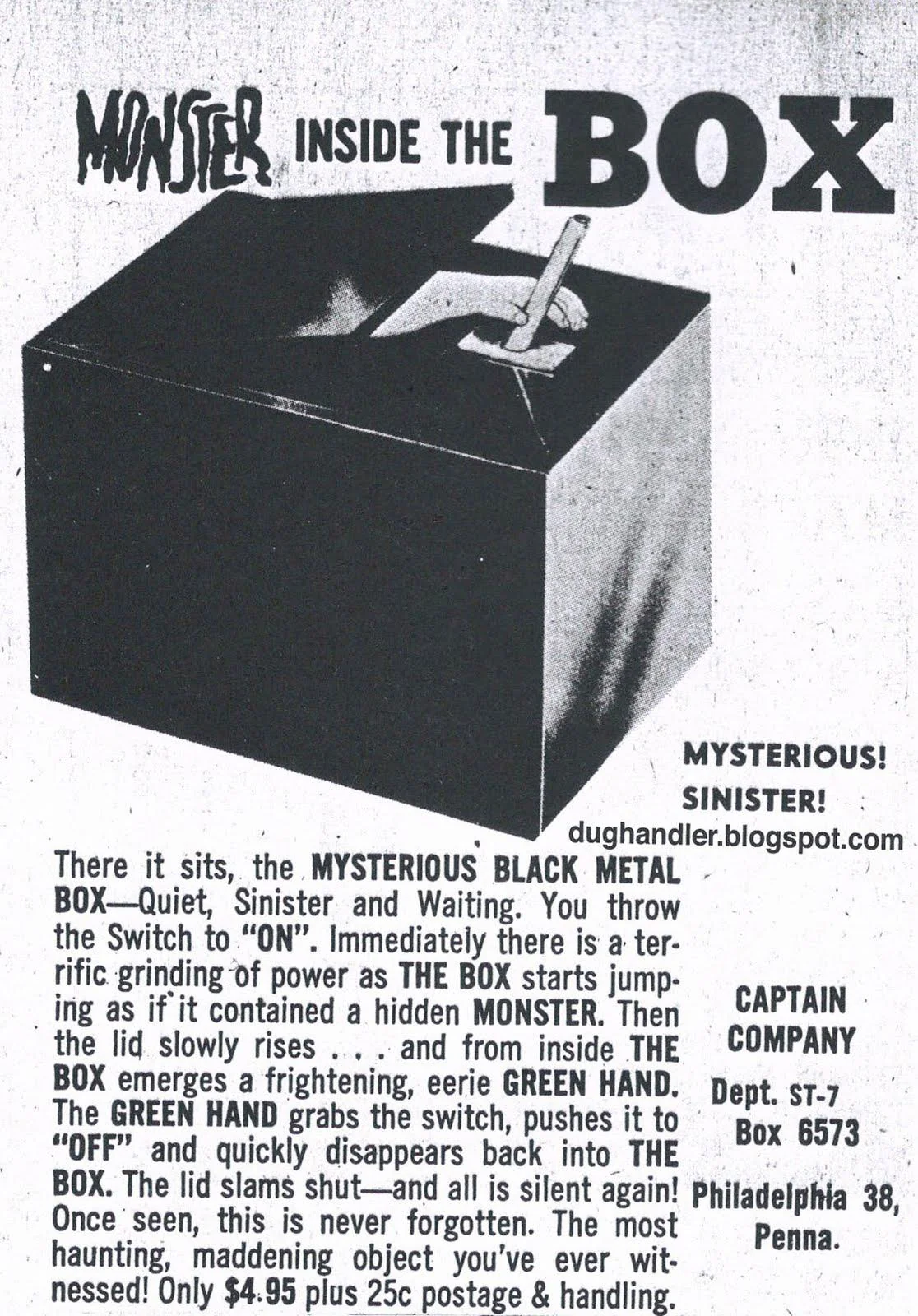
"Monster inside the Box" — $4.95.
"You throw the Switch to 'ON' … the lid slowly rises … The GREEN HAND grabs the switch, pushes it to 'OFF' and quickly disappears back into THE BOX."
One switch. A surprise. Back where it started. A laugh — and a shiver. All four properties, sold as a toy, sixty years before you build yours.
"Once seen, this is never forgotten." That is the bar for your version too.
What makes one
Four properties.
One control. Nobody needs instructions.
It does something you did not ask for.
It ends exactly where it began — ready to go again. Forever.
You laugh first. Then you wonder what it means.
Leave one out and it is a different thing: a game, a prank, or just a broken button.
Why it is not as useless as it looks
Most of the web is built to keep you clicking.
A useless machine is built to make you stop.
It has no goal, no score, no feed. It asks one question: why did you press it again?
On the web, it could be …
| The machine | What it might be saying |
|---|---|
| a button that runs away from your cursor | you always want what you cannot reach |
| a progress bar that reaches 99 % — and starts again | finished is a feeling, not a state |
| an "I agree" box that unticks itself | did you actually read it? |
| a to-do list that deletes each task as you add it | the list was never the work |
| a lamp that goes dark when the mouse comes near | some things only exist unobserved |
| a big red button that says "Do not press" | you were always going to press it |
Ideas to think with, not a menu. And the switch is taken — invent your own. On a phone there is no mouse: what does yours do there?
Every useless machine is a state machine
Draw the loop before you build it.
A state is what the machine is right now. An event is what moves it on. Property 3 means one thing: the last state is the first state.
If you cannot draw your loop in three or four boxes, it is not simple yet.
The brief
One page. One control. One surprise. Back to the start.
machine.html,machine.css,machine.js— in yourmy-sitefolder- One control that works with a mouse, a finger and the keyboard
- One surprise — something the user did not ask for
- It always returns to the start, ready to be used again — even if you click fast
- A name, and one sentence: what does your machine say?
- Linked from your nav — one edit, in
nav.html
Built with AI. Explained by you — every line, when asked.
You already know every part of this
| You need | From | In your machine |
|---|---|---|
a real <button> or <input>, with a <label> | lesson 2 | the one control — Tab reaches it, Space works |
classes, transition, transform | lesson 3 | how it looks, and how it moves |
one more link in nav.html | lesson 4 | the machine is a page of your site |
events, state, setTimeout | JavaScript | what it does — and when |
| a precise prompt · read · test · commit | recap, part 6 | how you build it |
This is the first exercise where you decide what to build. The parts are all familiar.
Step 1 · on paper, not in VS Code
Sketch it first.
- The control. What is the one thing a person can do?
- The surprise. What happens that they did not expect?
- The way back. How does it return to the start?
- The sentence. What is it saying?
Four boxes and some arrows. Then open the AI — you will know exactly what to ask for.
A prompt is a specification. You cannot specify what you have not decided.
Step 2 · describe it · fill in the brackets
Build a useless machine as one web page: machine.html, machine.css and machine.js, in my my-site folder.

The control: [one button / switch / slider / text field …]
When the user [does what], the machine [the surprise].
Then it [how it returns to the start], ready to be used again.

Rules:
- HTML, CSS and plain JavaScript only. No libraries, no frameworks.
- The control is a real <button> or <input> with a <label>, so it works with the keyboard.
- It must work on a phone: nothing may depend on hover alone.
- Add a link to machine.html in nav.html. Change nothing else on my site.
- Explain every line of the JavaScript.
The rules are the part people leave out — and the part that keeps your site intact.
The template, filled in · the classic
Build a useless machine as one web page: machine.html, machine.css and machine.js, in my my-site folder.

The control: one on/off switch, made from a checkbox.
When the user switches it on, the machine waits half a second, then a hand slides in from the side and switches it off.
Then the hand slides back out, ready to be used again.

Rules:
- HTML, CSS and plain JavaScript only. No libraries, no frameworks.
- The control is a real <input type="checkbox"> with a <label>, so it works with the keyboard.
- It must work on a phone: nothing may depend on hover alone.
- Add a link to machine.html in nav.html. Change nothing else on my site.
- Explain every line of the JavaScript.
This is the machine on slide 2. It is here to show the template working — not for you to build.
Step 3 · iterate · one change at a time
The first version works. Now give it a personality.
Make the machine wait a little longer each time it is switched on, as if it is getting tired.After the tenth time, let the machine give up and stay on — for three seconds. Then it switches off as usual.If the user has reduced motion turned on, keep the joke but remove the movement. Use prefers-reduced-motion.Commit before each one. Read what changed. Test it. Keep it — or undo it.
Before you show it
Check it like a stranger would.
- The control is a real
<button>or<input>—Tabreaches it,Spaceworks - It works with a finger: open DevTools' phone view and tap it
- It always comes back to the start — click fast, click twice, click during the surprise
- Nothing red in the Console — on the machine, and on every other page
- The nav still lives in
nav.htmlonly - You can explain every line. You will be asked to.
"Click during the surprise" is where most machines break. That is a state bug — and now you know what to call it.
In class · sixty seconds each
Show it without explaining it.
- Hand it to someone. Say nothing.
- Ask them: what is it saying?
- Then tell them what you meant — and which line of code makes the surprise happen.
If they laughed, it works. If they are still thinking about it afterwards, it really works.
Exercise · session 6
Build something useless.
Build it well.