
Small tools that keep running
Four case studies from a student who runs his own systems, plus a 3D laptop you can take apart.
by JIANG Sirui
Description
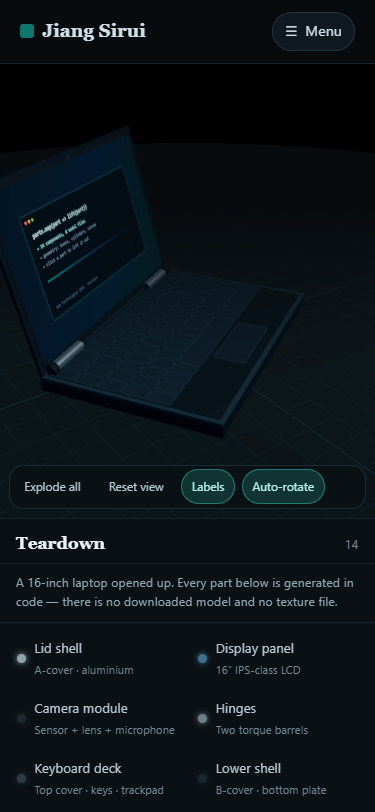
This is a portfolio, but it is organised around evidence rather than a list of skills. It has five pages: a landing page that says what I do, a page with four case studies, an interactive 3D teardown, a page of transferable notes, and an about page with contact details. The case studies are the heart of it. Each project is written in the same shape: the problem, the constraints I was working under, what I built, what broke, and what is still broken. The agent framework, for example, is presented through the supervisor bug that cost me two hours — the launcher process stays alive while it waits for a login, so "the process is running" is not the same as "the service is up". Every case study ends with an honest limitation, because a project page that admits nothing is a page nobody trusts. The notes page merges the material from the AI tools project into this site. It holds eight short notes on running local models and agents on a laptop — token budgets, tool naming, when to retry instead of debug — and the brief warned that a long page becomes unusable, so it has a keyword filter. The filter searches both the visible text and a hidden keyword list, then reports how many notes are showing, so an empty result explains itself instead of leaving a blank page. The teardown page is the newest part and the one I would demo first. A 16-inch laptop is built entirely from code in Three.js: fourteen components, no downloaded model, no texture files — the keycaps and the screen are drawn into canvas elements at runtime. Click a part and it lifts out of the chassis and highlights; the parts list and the detail panel stay in sync with the scene. The numbers in those panels describe a representative machine of this class, and the page says so rather than pretending they are measurements of one unit. Technically it is plain HTML, CSS and JavaScript with no backend, as the brief required: no accounts, no comments, no orders, and no storage anywhere. The one piece of state in the whole site is which notes the filter is currently showing, and that lives in memory and disappears when the page is closed. The navigation is shared the same way as in the first project, and every page carries a social preview image, a favicon and an app icon.
Desktop Homepage
Mobile Homepage
Open Graph Image
App Icon

Favicon